
From Words to Waypoints: Building an MCP Server and Igniting Entreprenuerial Momentum
Background
I wanted to share a little bit of my thoughts on AI before we jump into it. AI continues to disrupt and ingrain itself into everyday life and businesses worldwide. I don't think it's a trend and something that will go away. It's only going to keep evolving keep improving. I have seen engineers that have refused to adapt to this change. I have also seen engineers that have embraced this change and learn new ways of how to use it.
Democratize Information
AI has democratized access to information, the ability to brainstorm, and the ability to prototype among other things. However, there is no silver-bullet, there are pros and cons. You could say the pros outweigh the cons, it is important to know what cons exist so that you know how to mitigate against them.
There's been a lot of ambiguity as to if AI is going to replace engineers and the reality is that companies are still trying to figure out exactly the capabilities. The AI system hallucinate and it can make mistakes. AI Companies warn you about not using AI for legal or medical reasons. It is not a perfect system.
Use it as a sidekick
AI is a system that works best when you use it as a sidekick to make more informed decisions. It will help you multiply your outcome and productivity with said AI tool.
You have to be careful knowing when to use the tool because you have a hammer does not mean everything is a nail. We will use AI and build an MCP server to be our own sidekick to understand how these tools can work in our favor to create value.
Outline
We will build our own MCP server that will interact with an App that collects waypoints and descriptions. You can find the app here.
We know a lot of times the tool comes first and we don't know what to do with it. Sometimes we use tools to invent problems that don't exist. The tool can come first in the world of software engineering and where I see a lot of tools fail is not being clear on the problem they are solving.
AI Productivity
The introduction of AI systems has greatly increased our own productivity, whether it comes to speeding up the time to prototype using it to study or even generating images and videos. There are a lot of smart people that put a lot of effort into getting us to the stage. They have enabled a platform for us to extend and create tools for ourselves to solve everyday problems. Nowadays, we find ourselves, reaching for an LLM to ask a question as opposed to searching for Google.
Finding the right problem to solve
Given the exponential rise in AI systems, there are a lot of use cases that are coming up and everyday new tools being introduced.
A lot of times we are very excited to use these new tools and build solutions, but there are moments where you find yourself building for a problem that doesn't exist. How can you increase your chances to make that next software offering that will allow you to generate your own income. That idea that people are willing to give you money for in exchange for solving that problem they are having.
Validating your idea is solving the problem
We will also cover a little bit about frameworks you can use to help validate your idea. We're gonna learn about value-mapping, customer mapping, and a little bit about the business model canvas will also briefly touch on building feedback loops for your product.
Get Started
The application I have presented up here has very broad capabilities. It has an API where consumers can leave a message along with some waypoints. The app will display the latest collection of entries and it will display them all to see and share.
This is currently a means to deliver value & information as it's a tool. During this talk, we will try to find a specific use case for this using the business oriented framework.
Requirements
- Node.js 24
- Npm 11
- IDE
- Proficiency in terminal
- Claude Account (free tier is fine)
What do MCP servers solve?
MCP serves to allow a standardized way to delegate some work to an external service. We can deine our own MCP server in any language that supports the protocol. It also allows us to have a certain degree of deterministic behavior.
LLMs are not deterministic. If you provide a prompt, you will get a different answer each time. This is not great for systematic processes. It is also not possible for the LLM to act on your behalf to gather more context. Without it, LLMs provide outdated information and are limited on what type of workflows they can achieve for you.
Popular MCP Servers
Popular examples of MCP servers are context seven for getting the latest documentation information and then asking questions on that documentation. Another example is Jira MCP server where you can create tickets based on some information so that you don't have to login to create a ticket yourself.
Architecture
At it's most basic, this is how components connect with each other. The MCP server can be hosted locally via the desktop client runtime or it will exist via an endpoint accessible over the internet.
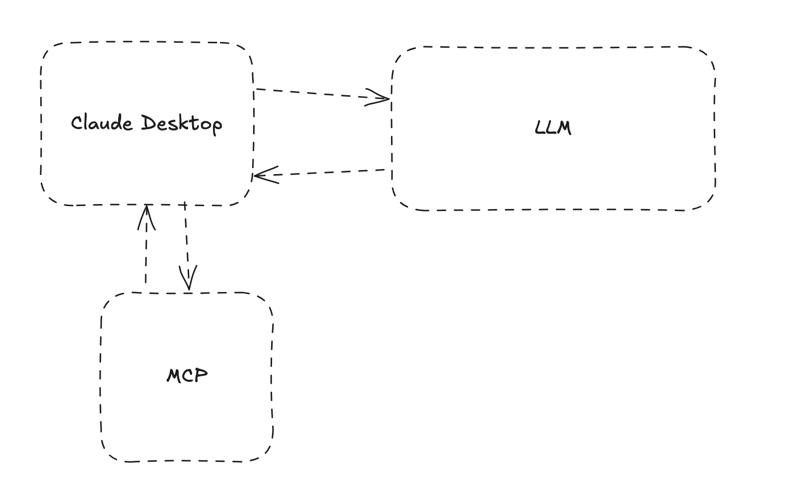
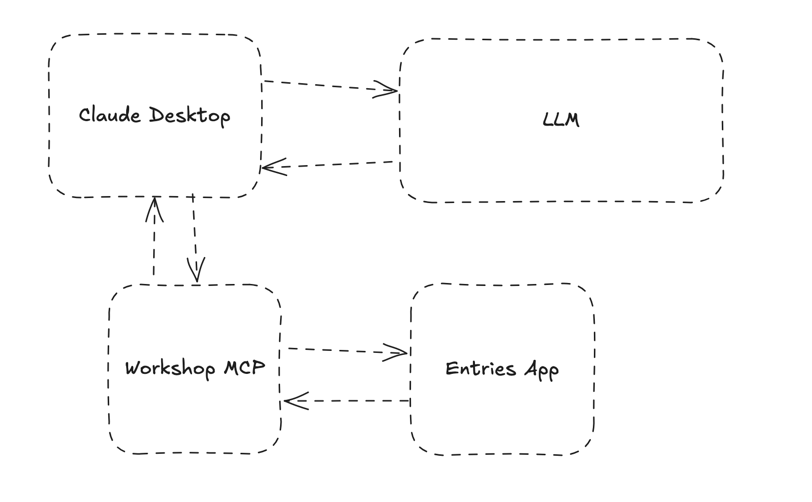
For this workshop our MCP server will be running locally. A user will send a request to Claude Desktop which interacts with the LLM. This is what the connections look like:
Build the MCP server
Pull down the boilerplate project down
git clone https://github.com/sanchezg7/workshop-mcp-server.git
Install dependencies
npm i
Install the model context protocol pacakge. This will help us to easily conform to the protocol.
npm i @modelcontextprotocol/sdk
I recommend committing your changes after each step. This will help you keep track of what you've done.
Create a new file to define our mcp server. Here are the Model Context Protocol Package Docs for reference.
touch src/mcp.ts
Declare your mcp server by adding the following code to the file.
import { McpServer } from "@modelcontextprotocol/sdk/server/mcp.js";

const server = new McpServer({
name: 'workshop-mcp-server',
version: '1.0.0'
});
Now we will register a basic tool that will do multiplication for us. While this is a trivial, we will use it to confirm our MCP server is integrating with claude.
First, install zod. We will need this to validate the input and output of our tool.
npm i zod@3
Add Zod, register a new multiply tool, and export the server.
import { McpServer } from "@modelcontextprotocol/sdk/server/mcp.js";
import { z } from "zod";

const server = new McpServer({
    name: 'workshop-mcp-server',
    version: '1.0.0'
});

server.registerTool('multiply', {
    title: 'Multiply',
    description: 'Multiply two numbers',
    inputSchema: {a: z.number(), b: z.number()},
    outputSchema: {result: z.number()}
}, async ({a, b}: { a: number, b: number }) => {
    const output = { result: a * b};
    return {
        content: [{type: "text", "text": JSON.stringify(output, null, 2)}],
        structuredContent: output
    }
});

export default server;
Finally, set up the transport mechanism. We will do this in a different file. Create src/stdio.ts.
In src/stdio.ts:
import {StdioServerTransport} from "@modelcontextprotocol/sdk/server/stdio.js";
import mcp from "./mcp.ts";

const transport = new StdioServerTransport();
await mcp.connect(transport);
Test the MCP server
Test the mcp server. List the tools available using std io and sending a jsonrpc command to it.
echo '{"jsonrpc": "2.0", "id": 1, "method": "tools/list", "params": {}}' | node src/stdio.ts | jq
This is the expected output from your mcp server.
{
"result": {
"tools": [
  {
    "name": "multiply",
    "title": "Multiply",
    "description": "Multiply two numbers",
    "inputSchema": {
      "type": "object",
      "properties": {
        "a": {
          "type": "number"
        },
        "b": {
          "type": "number"
        }
      },
      "required": [
        "a",
        "b"
      ],
      "additionalProperties": false,
      "$schema": "http://json-schema.org/draft-07/schema#"
    },
    "outputSchema": {
      "type": "object",
      "properties": {
        "result": {
          "type": "number"
        }
      },
      "required": [
        "result"
      ],
      "additionalProperties": false,
      "$schema": "http://json-schema.org/draft-07/schema#"
    }
  }
]
},
"jsonrpc": "2.0",
"id": 1
}
Multiply Tool
Now that we can communicate with the list command, let's invoke the multiply tool.
echo '{"jsonrpc": "2.0", "id": 1, "method": "tools/call", "params": {"name": "multiply", "arguments": {"a": 5, "b": 3}}}' | node src/stdio.ts | jq
This is the expected output from your mcp server.
{
  "result": {
    "content": [
      {
        "type": "text",
        "text": "{\n  \"result\": 15\n}"
      }
    ],
    "structuredContent": {
      "result": 15
    }
  },
  "jsonrpc": "2.0",
  "id": 1
}
You can also use the MCP Inspector tool to test your MCP server.
npx @modelcontextprotocol/inspector node src/stdio.ts
Select Connect at the bottom and you should see this page:
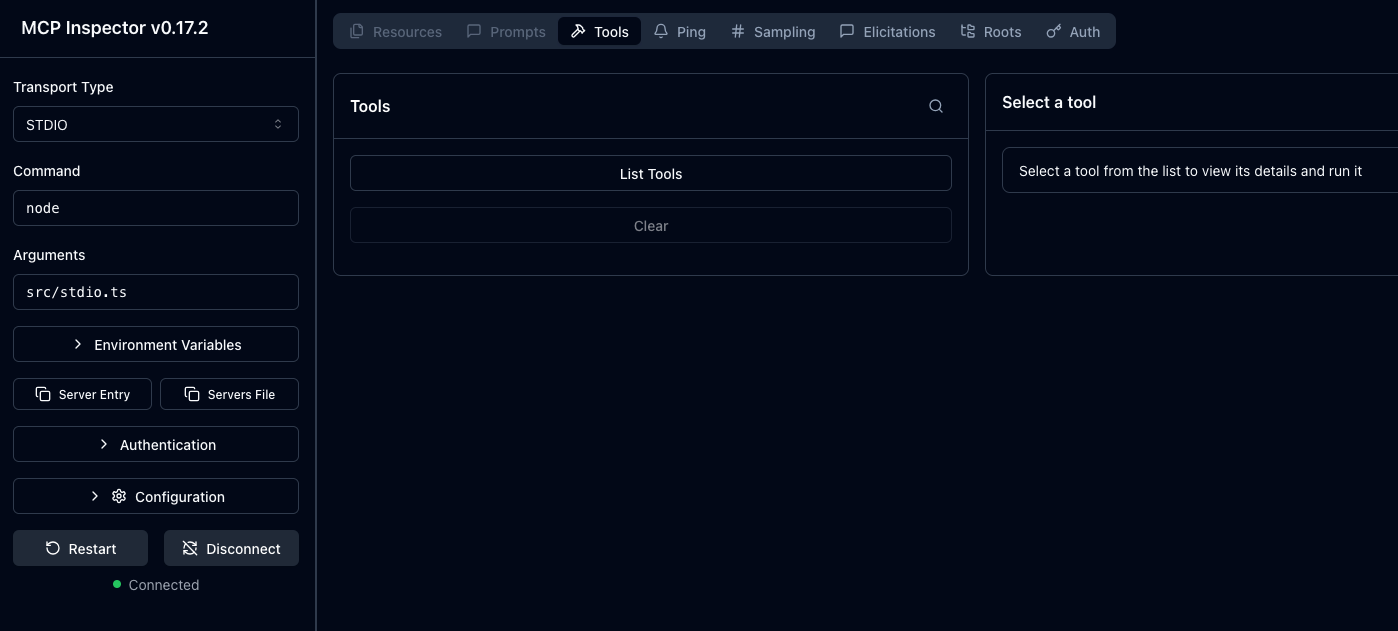
From there you can test that your mcp server is working in accordance with the protocol.
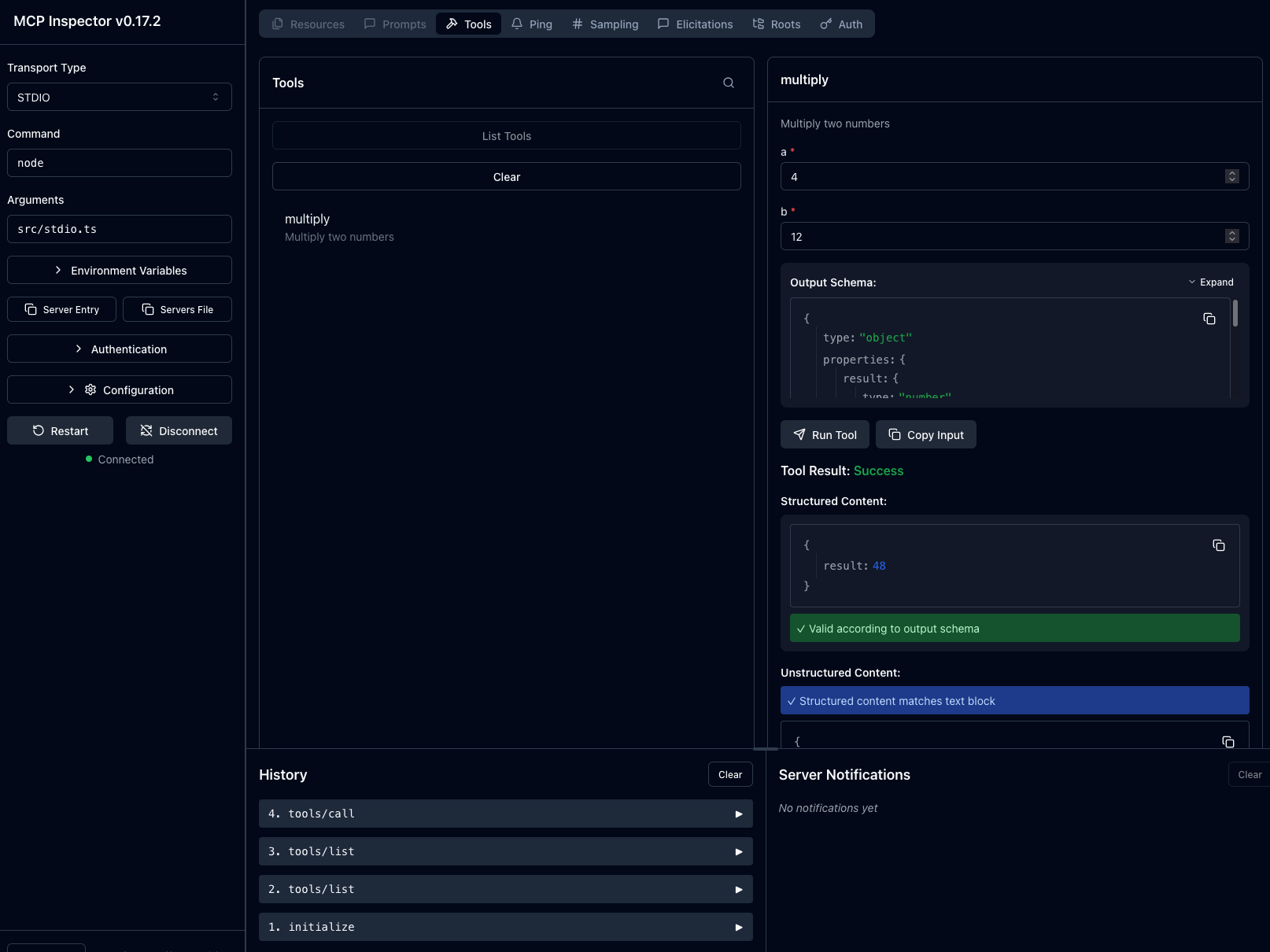
If you have gotten this far, you have successfully built your own MCP server. Now let's get it integrated with Claude Desktop.
Integrate MCP Server with Claude
It's now time to let Claude Desktop know about our new MCP server.
Go the developer settings in Claude Desktop.
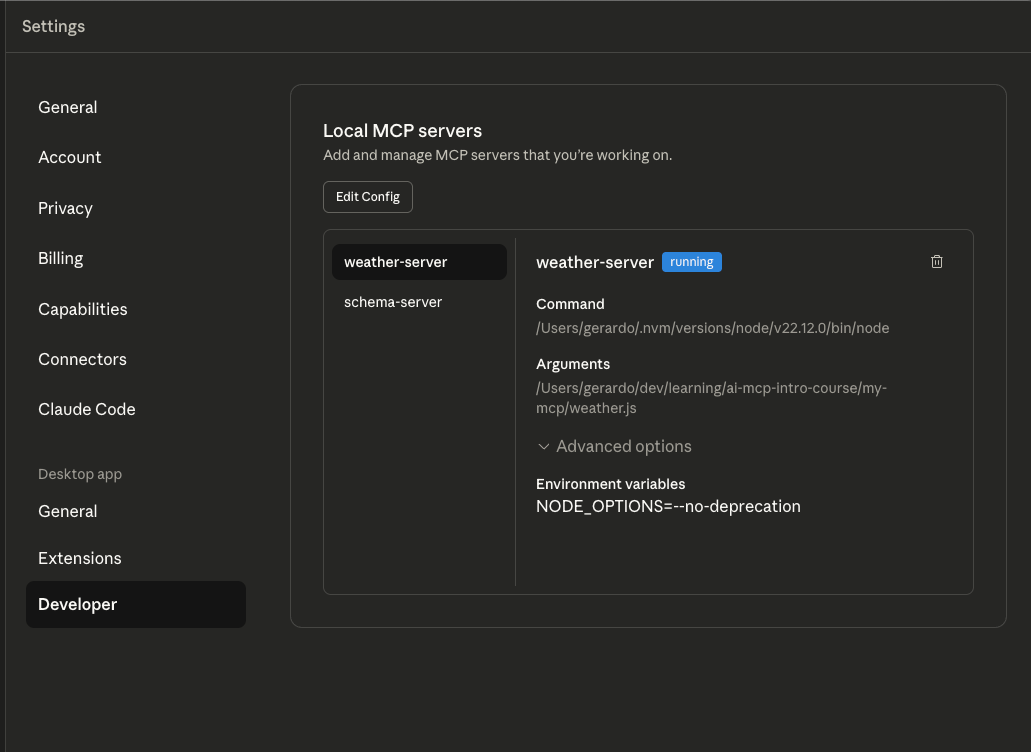
Edit Config
Select Edit Config to update your editor config.
Add this to your config to add the mcp server:
{
  "mcpServers": {
    "workshop-server": {
      "command": "/Users/gerardo/.nvm/versions/node/v24.6.0/bin/node",
      "args": [
        "/Users/gerardo/dev/talks/words-to-waypoints-mcp/workshop-mcp-server/src/stdio.ts"
      ],
      "env": {
        "NODE_OPTIONS": "--no-deprecation"
      }
    }
  }
}
Restart Claude Desktop to get it to load the new config. If you get errors, they may look like this:
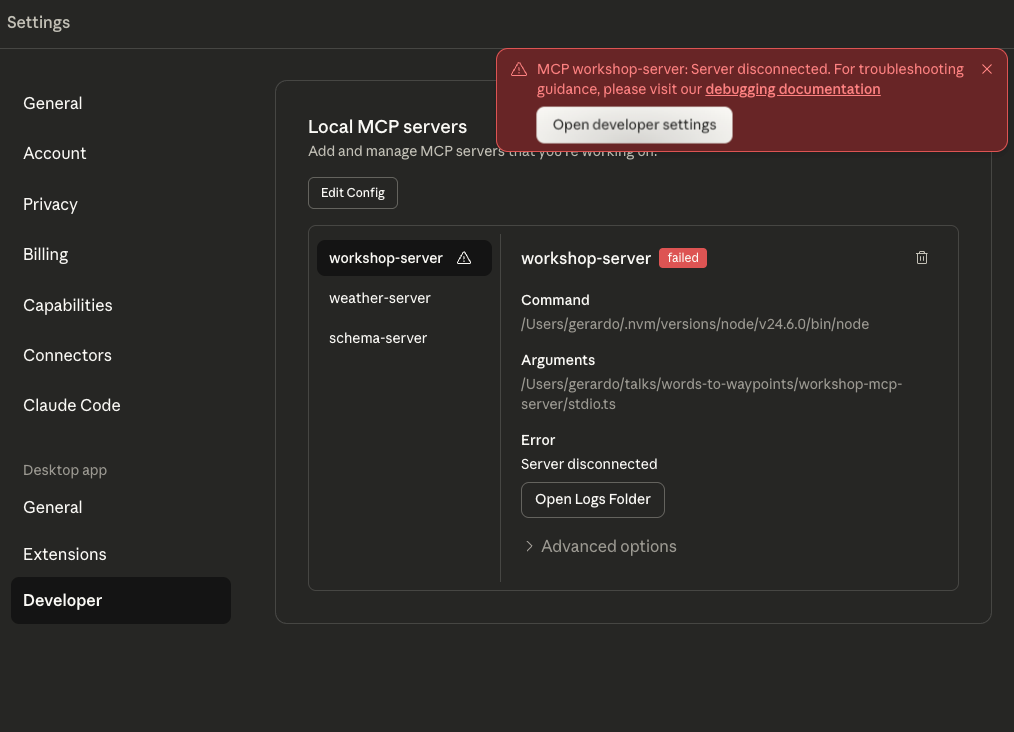
Select Open Logs
Find the respective log file. In this case it's mcp-server-workshop-server.log,
It may look like this:
2025-11-09T15:31:37.286Z [workshop-server] [info] Initializing server... { metadata: undefined }
2025-11-09T15:31:37.293Z [workshop-server] [info] Using MCP server command: /Users/gerardo/.nvm/versions/node/v24.6.0/bin/node with args and path: {
metadata: {
args: [
  '/Users/gerardo/talks/words-to-waypoints/workshop-mcp-server/stdio.ts',
  [length]: 1
],
paths: [
  '/Users/gerardo/.nvm/versions/node/v20.15.0/bin',
  '/Users/gerardo/.nvm/versions/node/v22.12.0/bin',
  '/Users/gerardo/.nvm/versions/node/v23.11.1/bin',
  '/Users/gerardo/.nvm/versions/node/v24.6.0/bin',
  '/usr/local/bin',
  '/opt/homebrew/bin',
  '/usr/bin',
  '/usr/bin',
  '/bin',
  '/usr/sbin',
  '/sbin',
  [length]: 11
]
}
} %o
2025-11-09T15:31:37.294Z [workshop-server] [info] Server started and connected successfully { metadata: undefined }
node:internal/modules/cjs/loader:1413
throw err;
^

Error: Cannot find module '/Users/gerardo/talks/words-to-waypoints/workshop-mcp-server/stdio.ts'
at Module._resolveFilename (node:internal/modules/cjs/loader:1410:15)
at defaultResolveImpl (node:internal/modules/cjs/loader:1051:19)
at resolveForCJSWithHooks (node:internal/modules/cjs/loader:1056:22)
at Module._load (node:internal/modules/cjs/loader:1219:37)
at TracingChannel.traceSync (node:diagnostics_channel:322:14)
at wrapModuleLoad (node:internal/modules/cjs/loader:238:24)
at Module.executeUserEntryPoint [as runMain] (node:internal/modules/run_main:154:5)
at node:internal/main/run_main_module:33:47 {
code: 'MODULE_NOT_FOUND',
requireStack: []
}

Node.js v24.6.0
2025-11-09T15:31:37.336Z [workshop-server] [info] Server transport closed { metadata: undefined }
2025-11-09T15:31:37.336Z [workshop-server] [info] Client transport closed { metadata: undefined }
2025-11-09T15:31:37.336Z [workshop-server] [info] Server transport closed unexpectedly, this is likely due to the process exiting early. If you are developing this MCP server you can add output to stderr (i.e. `console.error('...')` in JavaScript, `print('...', file=sys.stderr)` in python) and it will appear in this log. { metadata: undefined }
2025-11-09T15:31:37.336Z [workshop-server] [error] Server disconnected. For troubleshooting guidance, please visit our [debugging documentation](https://modelcontextprotocol.io/docs/tools/debugging) { metadata: { context: 'connection', stack: undefined } }
2025-11-09T15:31:37.337Z [workshop-server] [info] Client transport closed { metadata: undefined }
Let's fix the config to pass along the correct path.
Repeat this until the mcp server is running:
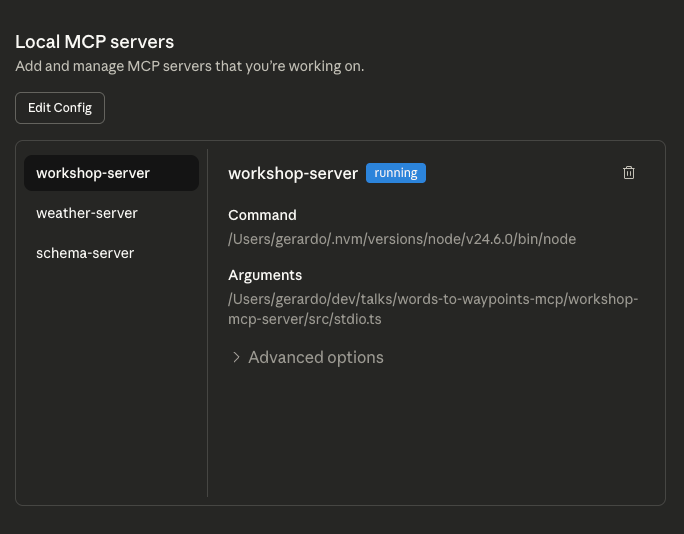
Claude Desktop will startup your mcp server located at the file specified. At this point it's running within the context of Claude Desktop.
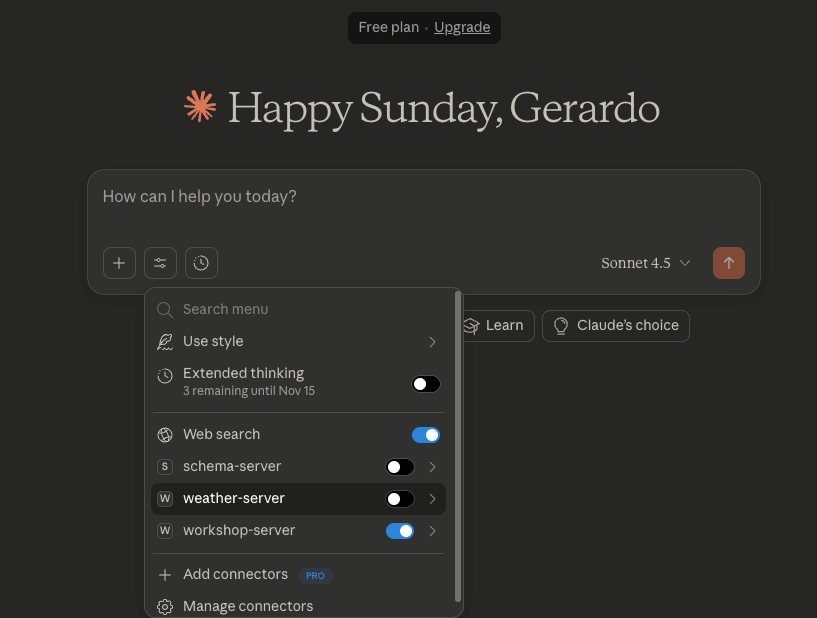
Now we will use the mcp server. Make sure it is turned on.
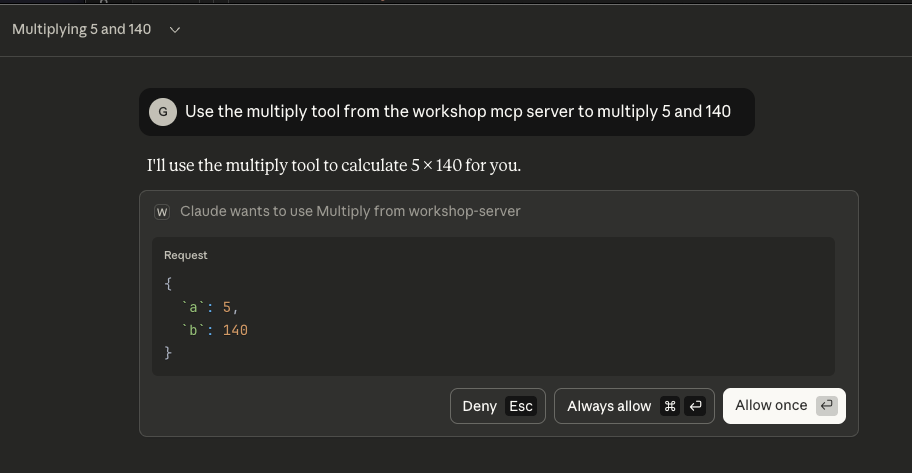
Claude will indicate it wants to use our mcp server for the first time. Select Always Allow.
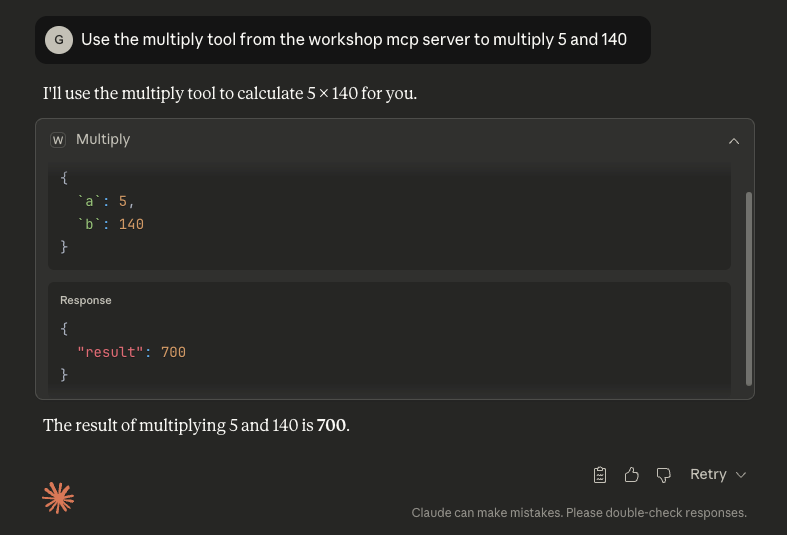
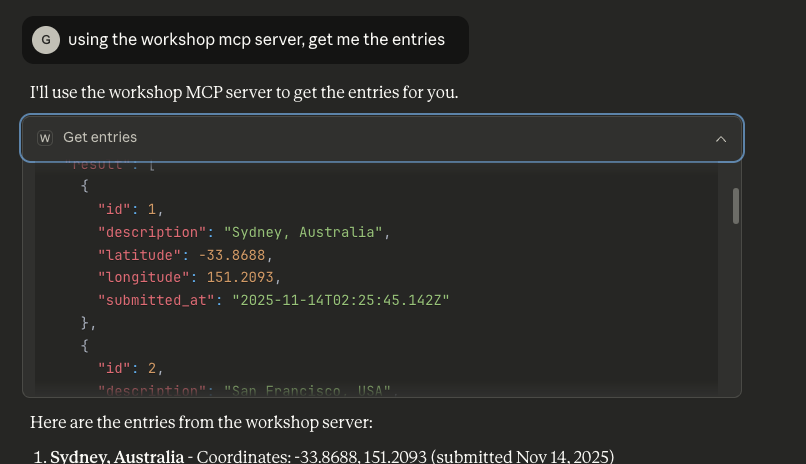
Confirm that claude is using the mcp server.
Extend the MCP Server for API integration
Now we create a new tool that will get the latest entry from the application.
now create the mcp server for the api server need a way to clear the data with an authenticated endpoint
Add new tool with types to get entries
In src/mcp.ts add a new tool that will get the latest entries from the API.
// Define the entry schema as a reusable schema
const EntrySchema = z.object({
    id: z.number(),
    description: z.string(),
    latitude: z.number(),
    longitude: z.number(),
    submitted_at: z.string().datetime()
});

// Define the output schema for the array of entries
const EntriesOutputSchema = z.object({
    result: z.array(EntrySchema)
});

// Type inference from the schema
type Entry = z.infer<typeof EntrySchema>;
type EntriesOutput = z.infer<typeof EntriesOutputSchema>;

server.registerTool('get-entries', {
    title: 'Get entries',
    description: 'Get the entries of a list',
    inputSchema: {},
    outputSchema: EntriesOutputSchema.shape
}, async () => {
    const response = await fetch('https://workshop.gsans.net/api/entries');
    const data = await response.json();

    // Validate the data conforms to the schema
    const validatedData = z.array(EntrySchema).parse(data);

    const result: EntriesOutput = { result: validatedData };

    return {
        content: [{type: "text", text: JSON.stringify(result, null, 2)}],
        structuredContent: result
    }
});
Test with the Inspector
Ensure that you are able to get the data flowing into your mcp server
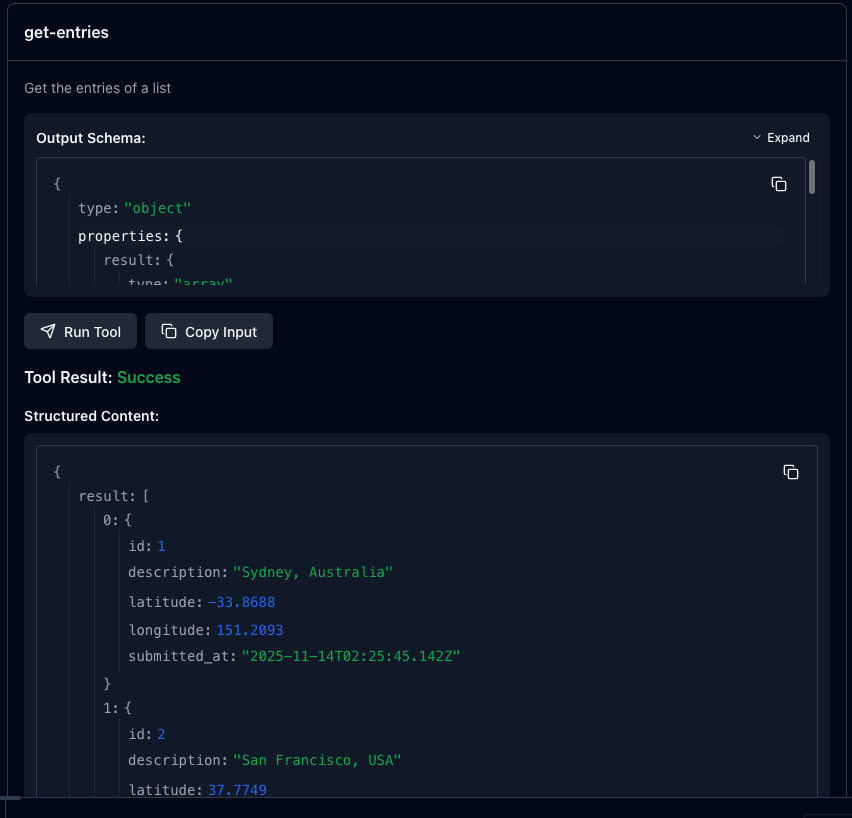
Restart Claude Desktop to restart your mcp server instance and get the new changes.
Test with Claude Desktop
Ensure the new tool is available.
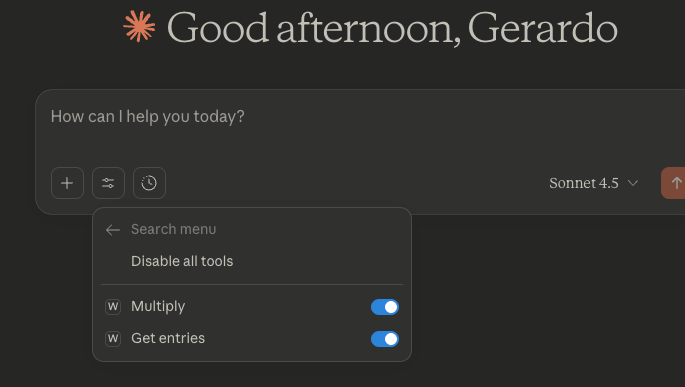
Allow Claude Access to run the tool as before.
Add new tool to create an entry
Now, we are ready to expose a new tool that will create a new entry.
Add the create-entry tool to src/mcp.ts.
server.registerTool('create-entry', {
    title: 'Create entry',
    description: 'Create a new entry',
    inputSchema: z.object({
        description: z.string(),
        latitude: z.number(),
        longitude: z.number()
    }).shape,
    outputSchema: EntriesOutputSchema.shape
}, async ({ description, latitude, longitude }: { description: string, latitude: number, longitude: number }) => {
    // Send a POST request to create a new entry
    const response = await fetch('https://workshop.gsans.net/api/entries', {
        method: 'POST',
        headers: { 'Content-Type': 'application/json' },
        body: JSON.stringify({ description, latitude, longitude })
    });

    const data = await response.json();

    let validatedArray: Entry[];
    try {
        validatedArray = z.array(EntrySchema).parse(data);
    } catch {
        throw new Error("Unable to parse response");
    }

    const result: EntriesOutput = { result: validatedArray };

    return {
        content: [{ type: 'text', text: JSON.stringify(result, null, 2) }],
        structuredContent: result
    }
})
Verify the new tool with Claude Desktop
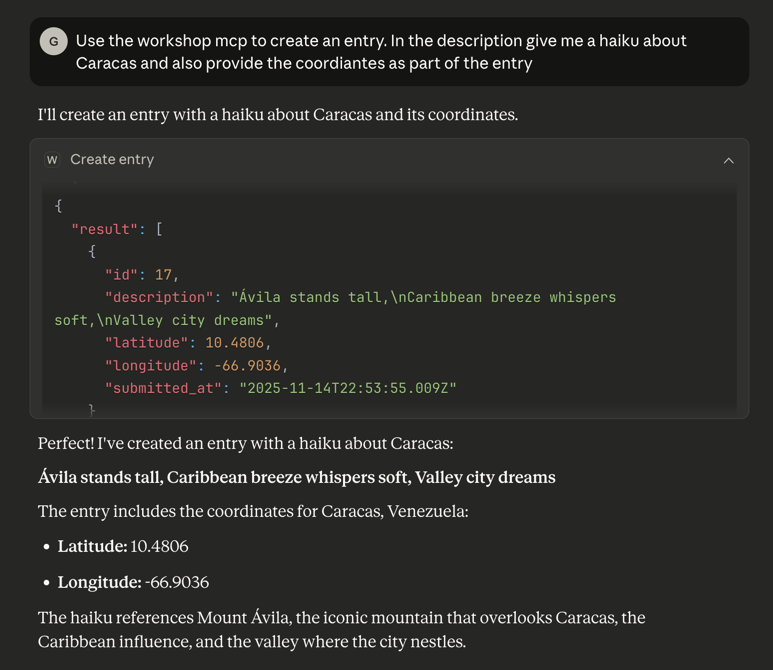
Igniting Entrprenuerial Momentum
Let's shift gears a bit and talk about how we can use this to derive value. Think about products and services that you pay for. Why do you pay for them? It must bring some value to you.
Value Map
This framework will help you to identify the value proposition of your product or service. It serves as a way to hypothesize about the value that your product or service brings to the table. You map pain points to pain relievers. You map gain creators to gains.
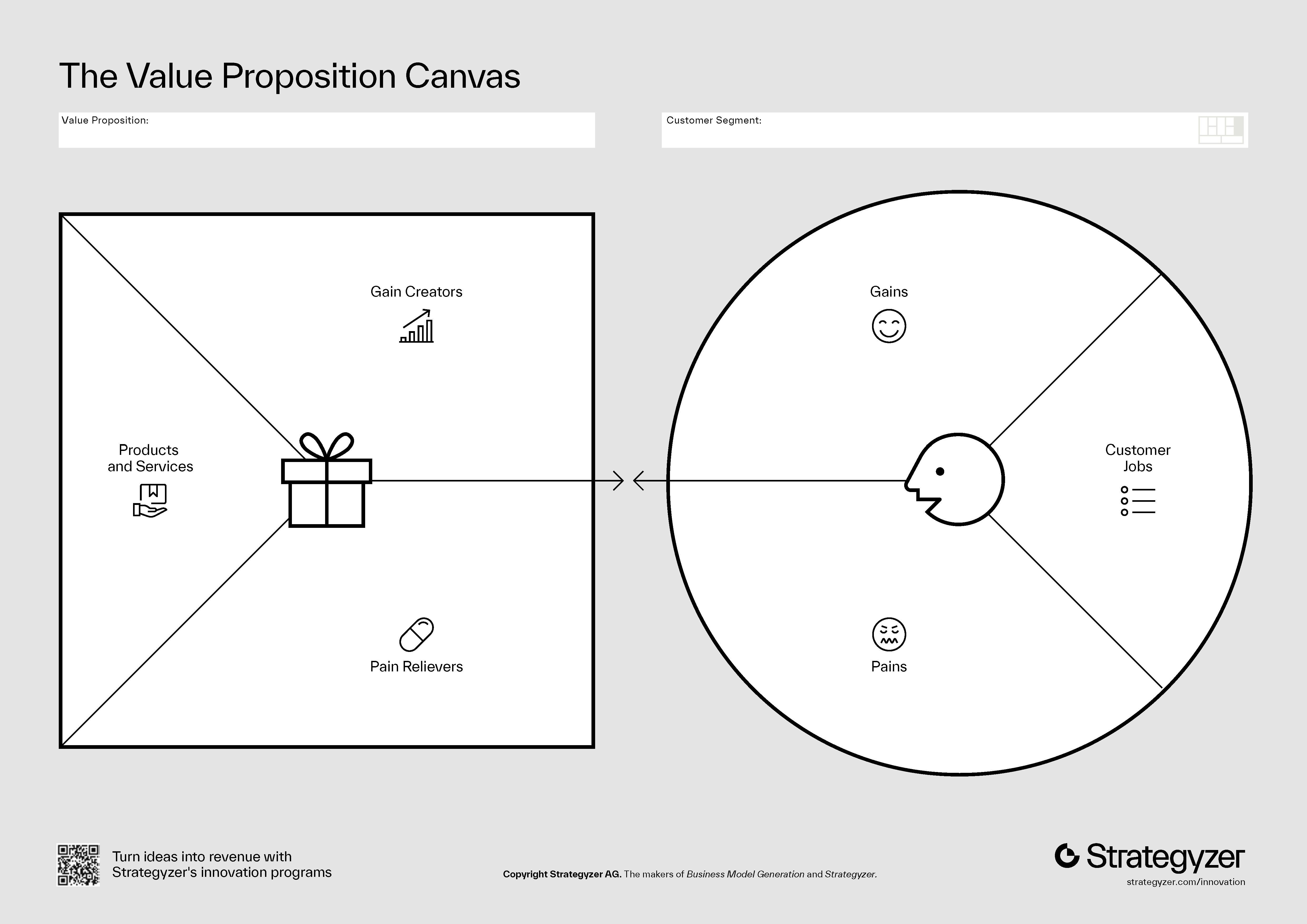 Source: Strategyzer
Business Model Canvas
Zooming out a bit more, the business model canvas helps you to understand the business model of your product or service.
This framework helps you to identify the key drivers of your business.
It helps you to understand the business model and the drivers that shape it.
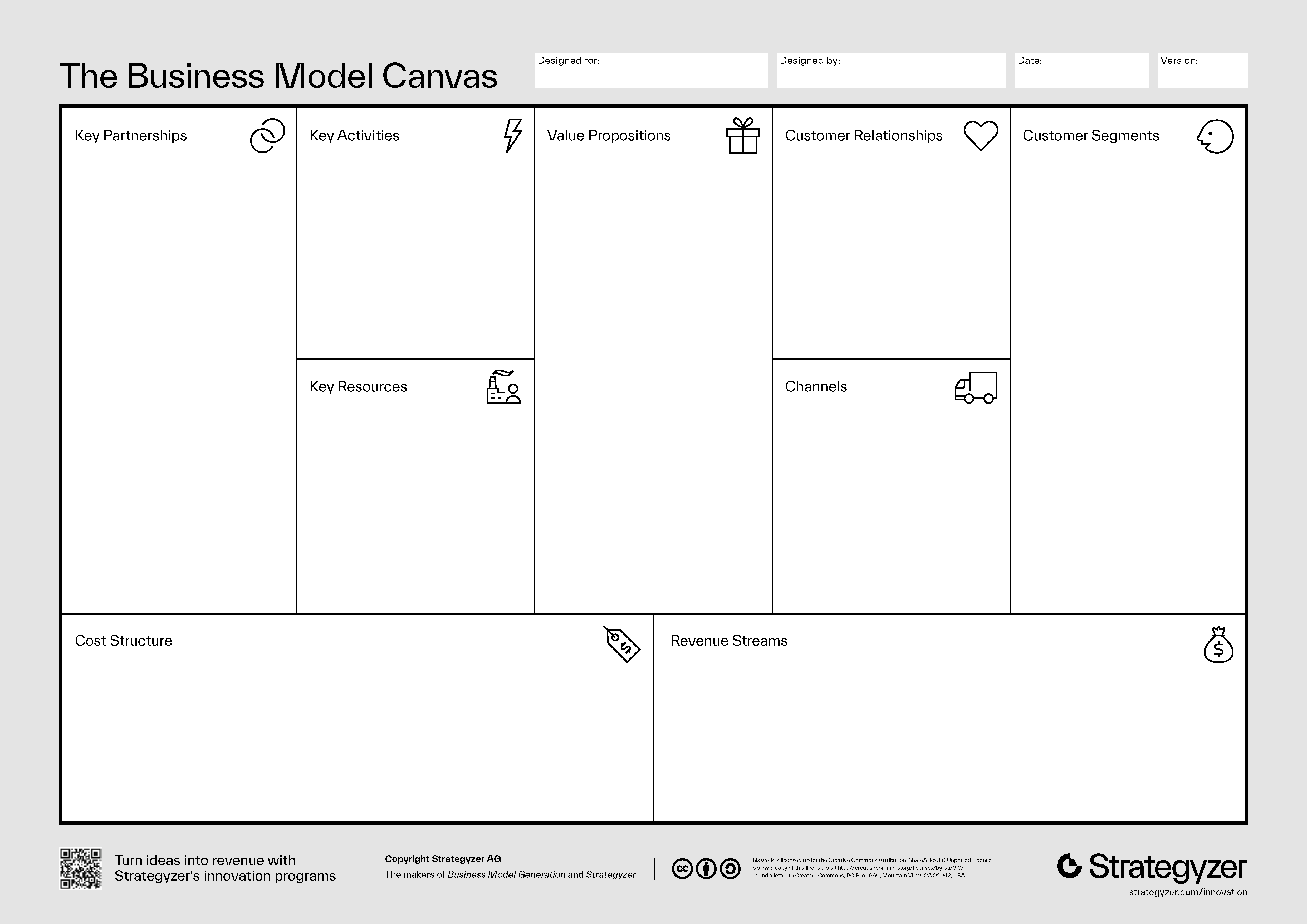 Source: Strategyzer